SewerCAD
A downloadable tool for Windows
SewerCAD is a complete desktop platform for sewer network modeling, hydrology, hydraulics, and regulatory compliance. From digitizing a subdivision's storm drain network to auto-sizing trunk mains, sizing detention ponds, and generating PE-ready design reports, SewerCAD handles the full workflow in one fast, dependency-light application
✨ Features
🗺️ Model Builder
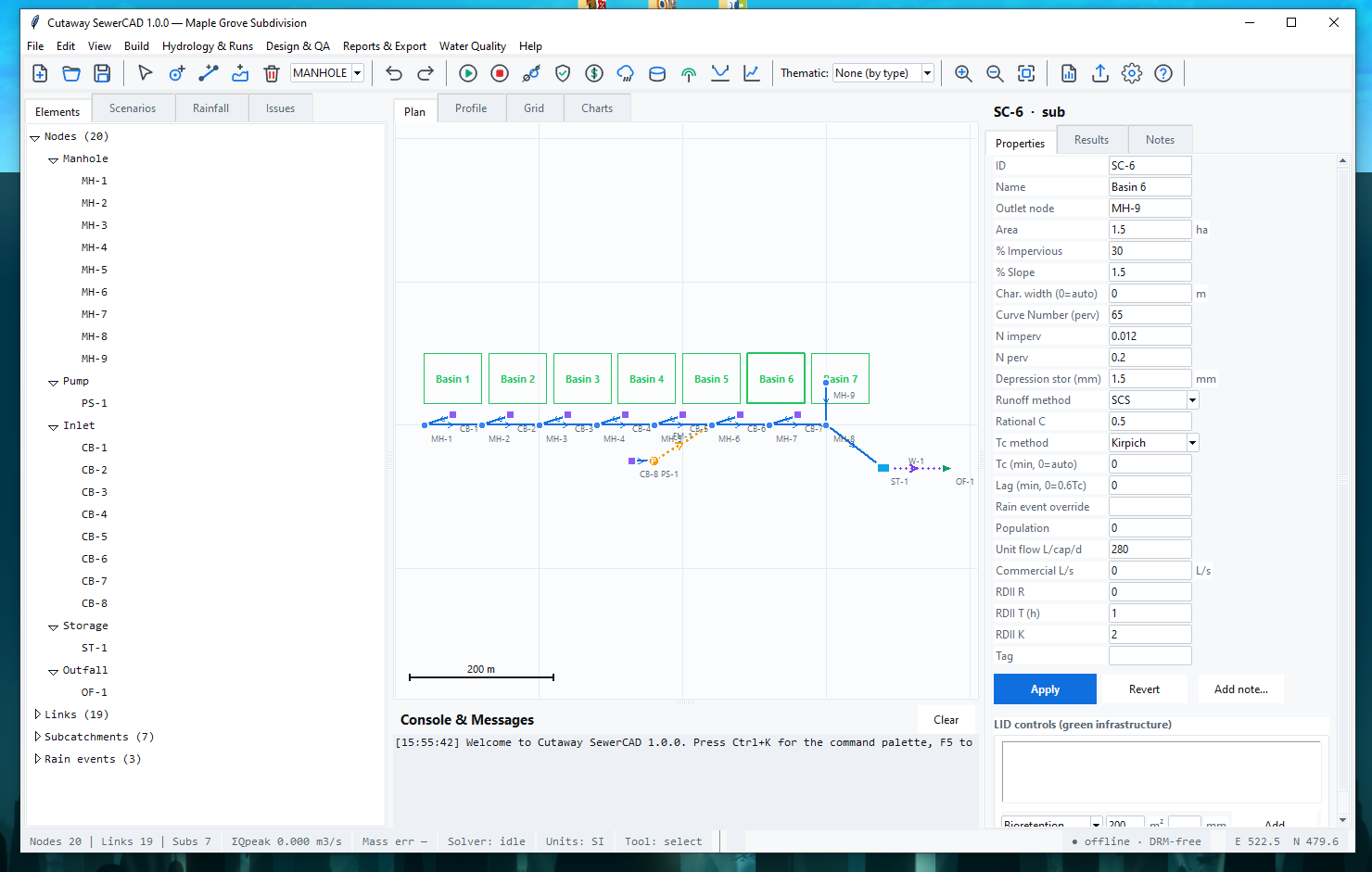
- 2D Plan Canvas with pan/zoom, adaptive grid, and scale bar
- Digitizing tools: add nodes by type (manhole, inlet, junction, outfall, storage, pump, boundary), draw pipes by clicking two nodes, sketch subcatchment polygons with automatic area calculation
- Snapping to existing nodes, hover tooltips with live results, right-click context menus
- Excel-grade element grid with type-to-edit cells, multi-row selection, CSV copy/paste both directions, fill-down, filters, and conditional result coloring
- Element Inspector with unit-aware fields, inline validation, and per-quantity "how was this calculated?" explainers
💧 Hydrology Studio
- Rainfall: IDF curves, design storms (SCS Type I / IA / II / III, Chicago, uniform, user series), climate uplift
- Time of concentration: Kirpich, FAA, kinematic wave, Bransby-Williams, Kerby, or user-defined
- Runoff: SCS/NRCS Curve Number with dimensionless unit hydrograph, Rational method, Green-Ampt and Horton infiltration
- Sanitary flows: Harmon, Ten States, and Babbitt peaking factors, diurnal patterns, RTK RDII
- Detention sizing: level-pool routing, iterative storage sizing, stage-storage-discharge tables
🌊 Hydraulics Engine
- Steady mode: design-peak propagation + standard-step backwater HGL, GVF profile classification (M1/M2/S1…)
- Dynamic mode: time-series routing with kinematic-wave link flow, travel-time lag, node storage, surcharge/flooding accounting, and mass-balance audit
- Structures: weirs, orifices, outlets, pumps (with curve interpolation), culverts
- Cross-sections: circular, rectangular, trapezoidal, triangular, egg, arch, horseshoe, and surveyed irregular sections
- Deterministic: identical model hash + version → identical results
🎯 Design & Optimization
- Auto-size pipes to commercial diameters under capacity, velocity, and cover constraints
- Auto-slope to hit target velocity
- Invert propagation downstream with minimum drop at structures
- Detention pond sizing with adjustable outlet configurations
- Cost estimator: installed pipe cost, structures, trench earthwork, NPV of capital + O&M
- Earthwork summary: cut, bedding, backfill, and spoil volumes by link
🌿 Water Quality & Green Infrastructure
- EMC-based pollutant loading (TSS, TN, TP, BOD5, COD, FOG, fecal coliform)
- LID library: bioretention, rain gardens, permeable pavement, green roofs, cisterns, infiltration trenches, vegetated swales, constructed wetlands, sand filters
- BMP removal-credit engine with regional variants (Chesapeake Bay, Great Lakes)
- Compliance ledger against MS4-style targets (e.g., "reduce TSS 50%")
✅ QA / QC & Validation
- Topology validation: dangling refs, orphans, unreachable nodes, duplicate links, adverse slopes, missing elevations
- Constraint rule packs: Ten States/Ohio EPA, EN 752, Sewers for Adoption 8th Ed, AS/NZS 3500.2, CPHEEO, and custom
- Mass-balance audit with 0.5% tolerance
- Completeness score (0–100), assumption registry, auto-repair (snap duplicates, set lengths)
📊 Results, Scenarios & Reporting
- >span class="">: d/D capacity, velocity, HGL vs rim, flooding, slope, diameter with color legends
- Time-series charts: hydrographs, rainfall, system inflow/outflow, brush crosshair, CSV/PNG export
- Long-section profile viewer with ground line, pipe inverts/crowns, HGL/EGL, and dynamic time scrubber
- Scenario manager: overrides, runoff multipliers, roughness multipliers, batch runs, side-by-side comparison
- Design report generator: live-bound narrative, auto tables, HTML/PDF/XLSX export
- Export: EPA SWMM 5.x INP, GeoJSON, CSV grids, results XLSX
🖥️ Application Experience
- Light & dark themes with full design-token system
- SI ⇄ US Customary unit switching (all internal storage remains SI — lossless)
- Command palette (Ctrl+K) to search every command and element
- Undo/redo with 200-step history
- First-run wizard with three sample projects: Maple Grove subdivision, Riverside combined system with CSO, and sanitary collector demo
- Keyboard-first: F5 run, F7 QA, Ctrl+S save, Ctrl+F find, Esc back to select
- Offline & DRM-free — no license checks, no telemetry, no network calls
📁 Import / Export
- Import: SewerCAD
.scproj, EPA SWMM.inp, GeoJSON, CSV node/link/subcatchment grids - Export:
.scproj, SWMM.inp, GeoJSON, CSV, XLSX, HTML/PDF reports - Baselines: freeze model snapshots with hash tracking for audit trails
❓ FAQ
Q: What file formats can I import and export?
A: Import .scproj, EPA SWMM .inp, GeoJSON, and CSV grids. Export .scproj, SWMM .inp, GeoJSON, CSV, XLSX, and HTML/PDF design reports.
Q: Can SewerCAD handle both sanitary and storm sewer systems? A: Yes. SewerCAD supports sanitary collectors, storm drainage networks, combined systems with CSO chambers, force mains, pump stations, detention ponds, and green infrastructure — all in one model.
Q: How accurate is the hydraulics engine? A: The engine implements Manning's equation, standard-step backwater (gradually varied flow), critical and normal depth solvers, weir/orifice/pump hydraulics, level-pool storage routing, and kinematic-wave dynamic routing. Mass balance is audited to a 0.5% tolerance. It is deterministic: identical model hash + engine version → identical results.
Q: Does SewerCAD replace a licensed professional engineer? A: No. SewerCAD is a design and analysis tool. Engineering judgment and licensed-PE review are required before construction or submittal. The software is not a substitute for professional engineering practice.
Q: Can I use SewerCAD for regulatory submittals? A: Yes, with appropriate engineering review. SewerCAD includes jurisdiction rule packs (Ten States/Ohio EPA, EN 752, Sewers for Adoption 8th Ed, AS/NZS 3500.2, CPHEEO, and custom), QA/QC dashboards, mass-balance audits, assumption registries, and design report generators to support submittal workflows.
Q: How does auto-sizing work? A: SewerCAD reads peak flows from the latest run (or performs a fresh steady analysis), then selects the smallest commercial diameter that passes the flow at d/D ≤ the jurisdiction maximum while satisfying velocity (self-cleansing minimum and scour maximum) and cover constraints. It previews changes with cost deltas before applying.
Q: What is the detention sizing routine? A: SewerCAD performs level-pool routing with RK4 time-stepping and adaptive substepping. It iteratively scales storage area until peak outflow meets your allowable release, then reports required volume, max depth, attenuation percentage, lag time, and a full stage-storage-discharge table.
Q: Can I run multiple scenarios and compare them? A: Yes. The scenario manager supports per-element overrides, runoff and roughness multipliers, and batch execution. Results are compared side-by-side in a dedicated comparison window.
Q: How does the water quality module work? A: It uses Event Mean Concentration (EMC) loading by pollutant, applies LID volume capture and BMP removal credits (with regional variants), and produces a compliance ledger against your regulatory targets (e.g., TSS 50% removal). LID capital costs are also estimated.
Q: Does SewerCAD support unit switching between SI and US Customary? A: Yes. Toggle between SI (m, m³/s, mm) and US Customary (ft, cfs, in) at any time. All internal storage remains SI, so conversions are lossless and round-trip exactly.
Q: Can I export to EPA SWMM for review?
A: Yes. SewerCAD exports a SWMM 5.x-compatible .inp file including options, raingages, timeseries, subcatchments, subareas, infiltration, junctions, outfalls, storage, conduits, xsections, weirs, orifices, pumps, curves, coordinates, and report settings.
Q: How do I get help?
A: In-app help includes keyboard shortcuts (Ctrl+K command palette, F5 run, F7 QA), a workflow guide, and an "About" panel. Every result field has a "?" explainer describing how it was calculated. The console logs all actions and errors.
Customer Support:
You can get support by either commenting here or visiting our discord server and ask help with the software, Discord Server Link : https://discord.gg/vVpeXp7mJb
Purchase
In order to download this tool you must purchase it at or above the minimum price of $495 USD. You will get access to the following files:

Leave a comment
Log in with itch.io to leave a comment.